

Delegating Plans to the Reseller
In order to organise the process of sailing the Services, the delegation of Plans is used.
Before the creation of the Plans, you must add Plan Classes (see Managing Plan Classes), which will be used for this Plans (see Managing Plans).
If Plan is delegated to downline Resellers, this Plan gets the same Plan Class, which has been set to the Plan by the Operator (upline Reseller).
To delegate a Plan to a Reseller:
- Sign in to the Operator Control Panel.
- On the Navigation Bar, click Operations > Operations > Resellers. The Workspace displays the List of Resellers.
- Click the Name link of the required Reseller.
- Click the Delegated Plans tab.
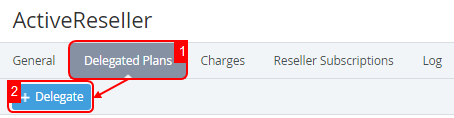
- Click the Delegate button on the Toolbar of the Delegated Plans tab.
Select plans checkbox on the Delegate Plans page.
You can use the Search field on the Toolbar and sorting functions for the ID and Name rows to find Plans which will be delegated.
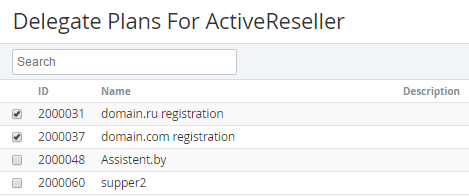
Click Add. The list of delegated service plans will be displayed on reseller's page.
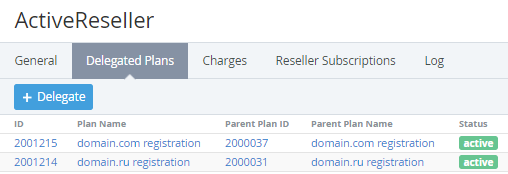
The Workspace displays the following blocks:- Top bar (for more information see Working with the List of Objects);
- List of Plans with the following columns:
- ID — a unique identification number of a plan;
- Plan Name — a name of the delegated plan;
- Parent Plan ID — a plan ID that was delegated by an Operator (upline Reseller);
- Parent Plan Name — a plan name that was delegated by an Operator (upline Reseller);
- Status — the plan status:
- active - a plan is available for customers;
- inactive - a plan is not available for customers;
- deactivated by provider - a plan was deactivated by upline Reseller.