
Resellers and vendors may require mandatory acceptance of terms of use, including:
-
Terms and Conditions — an agreement between the reseller and the customer. The customer cannot start working in the platform or order a subscription without accepting these terms.
-
Microsoft Customer Agreement — an agreement between Microsoft as the vendor and the customer. This is required when the customer orders a subscription for Microsoft services.
Resellers and vendors can also request re‑acceptance of agreements at any time. The current agreement remains valid until a new one is accepted (see also Accept agreements).
To view the list of agreements accepted on behalf of an account:
-
Click the user name in the upper right corner on any page. The user menu is displayed.
-
In the user menu, select Accounts. A page with the list of accounts associated with your user is displayed (see Accounts).
-
Click the name of the required account. A page with the account details is displayed (see Account details).
-
Go to the Agreements tab.
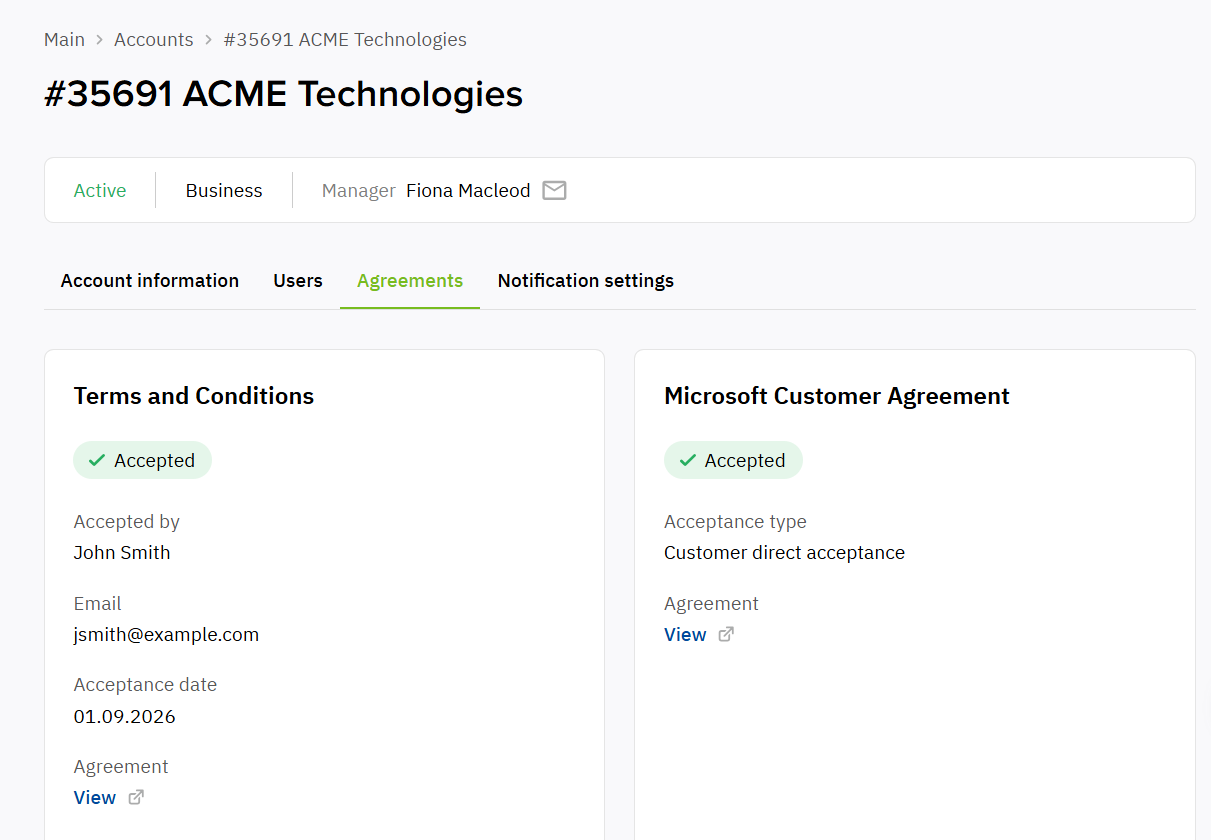
On the Agreements tab:
-
Agreement type:
-
Terms and Conditions.
-
Microsoft Customer Agreement (if applicable).
-
-
An indicator showing that the agreement is accepted.
-
Accepted by — the name of the account’s user who accepted the agreement.
-
Email — the email of the user who accepted the agreement.
-
Acceptance date — the date when the agreement was accepted.
-
Acceptance type — the type of the acceptance agreement:
-
Customer direct acceptance — the agreement was accepted when creating/adding a Microsoft tenant in the Operator Control Panel.
-
Partner attestation — the agreement was accepted in the process of buying a subscription or authorizing in the Customer Control Panel.
-
-
Agreement — a link to the agreement.