
The log stores entries about events in the Customer Store Control Panel.
To view the Customer Store log:
-
Go to Storefront (see Navigation). The General tab of the Customer Store Control Panel is displayed (see Customer Store general settings).
-
Go to the Log tab. The list of log entries is displayed.
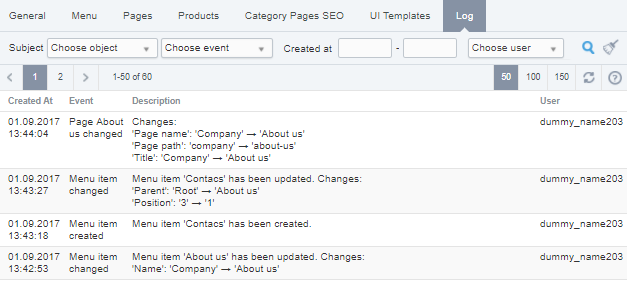
The Log page has the following sections:
-
The toolbar allows filtering the log entries list and searching an event by following parameters:Subject — the subject of an event. It includes the event object and event type:The General object — general settings of Customer Store. Event types:Tenant status changed — changing of Customer Store status.General information changed — changing of Customer Store general information.Domain information changed — changing of Customer Store domain information.Synchronization settings changed — changing of synchronization settings or manual synchronization of Customer Store data.The Product object — operations with products. Event types:Product page SEO information changed — changing of product page SEO information.Product Cross-selling settings changed — adding or removing related products.The Category pages SEO object — changing of category pages SEO information. Event types:Category changed — changing of category page SEO information.The Pages object — operations with information pages. Event types:Page created — creating an information page.Page changed — editing an information page.Page created — deleting an information page.The Menu object — operations with the menu items. Event types:Menu item created — creating a menu item.Menu item changed — editing a menu item.Menu item deleted — deleting a menu item.The UI Templates object — operations with UI templates. Event types:'Layout' changed — changes in the Layout UI template.'Product showpage' changed — changes in the Product showpage UI template.'Category page' changed — changes in the Category page UI template.'Catalog' changed — changes in the Catalog UI template.'Infopage' changed — changes in the Infopage UI template.Created at — the time and date of an event in the dd.mm.yyyy hh:mm format.User — the name of a manager, who created an event.
-
A table with the following columns:Created at — the time and date of an event in the dd.mm.yyyy hh:mm:ss format.Event — the event type.Description — detailed information about an event.User — the name of a manager who created an event.