
To view and update domain's information:
-
Sign in to the Operator Control Panel.
-
On the Navigation Bar, go to Domains (see Navigation). The list of Domains is displayed (see Viewing the List of Domains).
-
Click the ID or Name link for the necessary Domain.
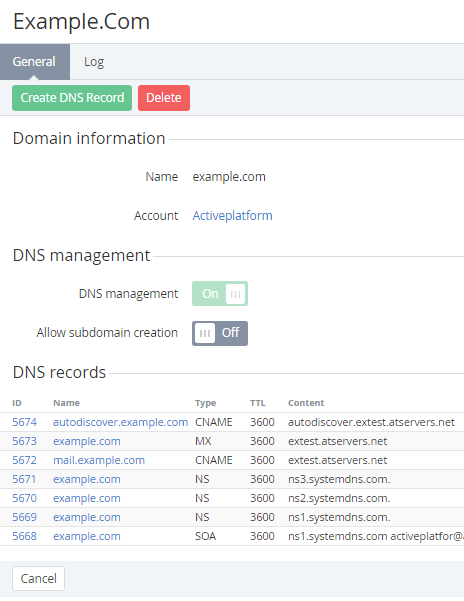
You see domain's details page, which consists of following tabs:General — general domain information (for internal domains the expiration and registration dates are displays), DNS management options and DNS records;Log — a history of operations with the domain.
You can change the following DNS management options:
-
DNS management — ability to create and edit DNS Records. In addition, for the Registrar should be registered provider's name servers;
-
Allow subdomain creation — ability to create and edit subdomain for the selected domain.