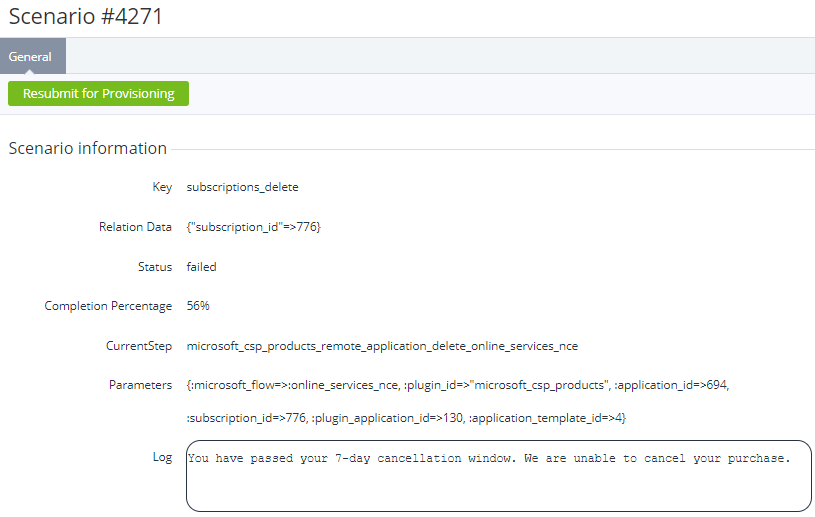
To view the details of an automatic operation based on a scenario:
-
Go to Scenarios (see Navigation). The list of operations is displayed (see Viewing automatic operation details).
-
Click the ID of the required operation. The operation details page is displayed.
The page includes the following elements:
-
Resubmit for provisioning — a button to re-run a failed operation.
-
Scenario information — a group of elements depending on the operation type and status:Key — the operation key that defines its type.Relation Data — a list of the IDs of the related entities.Status — one of the following statuses of the operation:Prepared — the operation is created but has not started yet.Running — the operation is being performed.Completed — the operation is successfully performed, and all scenario steps are completed.Failed — the operation failed due to an error.Waiting for retry — the previous attempt to perform the operation failed, and the next attempt is awaited. The number and period of attempts depend on the operation type.Completion Percentage — the completion percentage of the operation.Current Step — the key of the current scenario step (except for completed operations).Parameters — a list of parameters of the operation depending on its type (if any).Attempt Count — the current attempt number / the total number of attempts until the operation fails (only for operations in the Waiting for retry status).Next Attempt — the date and time (DD.MM.YYYY HH:MM) to run the next attempt (only for operations in the Waiting for retry status).Log — a description of the occurred error on a response from a service received on a failed attempt (except for completed operations).