
To view the list of managers, go to Managers (see Navigation).
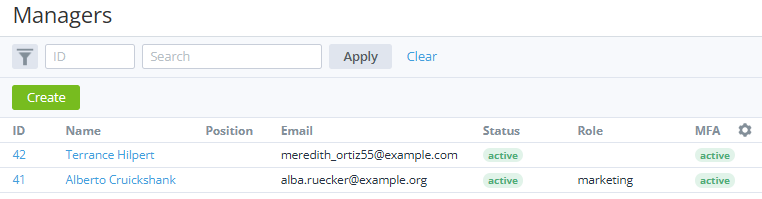
The list of managers includes the following columns:
-
ID — the unique identification number of a manager.
-
Name — the name of a manager.
-
Position — the position of a manager (if specified).
-
Email — the manager's email used as the login for signing in to the Operator Control Panel.
-
Status — the manager's status:Active — a manager has access to the Operator Control Panel.Inactive — a manager has no access to the Operator Control Panel.
-
Role:An empty field (on the root level only) — a manager is an administrator with full access to all sections of the Operator Control Panel.The role name — a manager with limited access to specific sections of the Operator Control Panel (see Managers' roles).
-
MFA — the status of using multi-factor authentication (see Manager settings):Active — a manager uses one of the configured MFA methods (see Configuring manager's MFA methods).Inactive — a manager has no configured MFA methods.
-
Key — the manager's unique key. By default, the column is not displayed.
This key allows linking an account to a manager (see Viewing and updating account's details) automatically when a customer orders a new service via Customer Store with a special URL parameter (see Buy-link template for ordering a service via Storefront). The key can include uppercase and lowercase characters, numbers, underscore, dot, and dash. The key is case-sensitive, so it is important to specify it in a buy-link exactly as on the manager information page. For example, carter81 and Carter81 are different keys, and they will not work together for the same manager.