For the general description of the procedure, see in the Customer Control Panel guide.
In this article:
Specifics and limitations
-
Amazon Web Services has only one period — the endless.
-
Changing resources of an Amazon Web Services subscription is not available since all information about its resources is stored on the service side.
-
A subscription is free, and you only pay for the consumed resources (pay-as-you-go).
-
A subscription in the platform corresponds in AWS to the fact that your account belongs to the reseller organization. If you do not have an AWS account, creating a subscription in the platform involves creating an account directly within the reseller organization. If you already have an AWS account, creating a subscription in the platform involves inviting the account to join the reseller organization. You have 15 days to accept the invitation, otherwise, a subscription fails. To send an invitation, your account root user email is required. Invitations sent to other account users in AWS are not eligible to join a reseller organization. AWS does not validate the email to which the notification is sent.
-
When a subscription is created, you receive 2 messages:
-
To the specified email:
-
For a new AWS account — an instruction from AWS.
-
For an existing AWS account — an invitation to join the reseller organization.
-
-
To the Owner email — the subscription activation instruction from your reseller (see also Activate Amazon Web Services subscription).
-
Additional information
Ordering an Amazon Web Services subscription includes one additional step.
On the Additional information step:
-
If you do not have an AWS account:
-
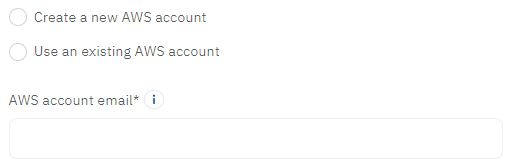
Make sure that in the Choose an AWS account group, the Create a new AWS account option is selected.
-
In the AWS account email field, enter an email for the root user of the account in AWS. You can add other users later after activating a subscription.
-
-
If you already have an AWS account:
-
In the Choose an AWS account group, select Use an existing AWS account.
-
In the AWS account email field, enter the email of the root user of your AWS account.
-