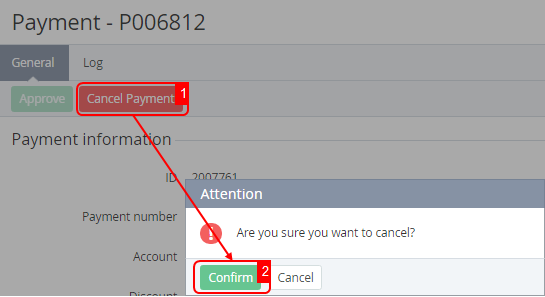
A payment can be cancelled as follows:
-
Automatically — only a Payment for order in the Waiting for payment status. For example, when a linked order is cancelled due to its expiration (see Cancel unpaid order in in Creating an account class).
-
Manually — only a Payment for order and Payment for the manual topping up of the balance in the Waiting for payment status. The linked order is also cancelled.
-
Payments for rendered services can be cancelled manually only when external management of invoices for the Postpay model by a third-party ERP system is activated, and the linked invoice has not yet been approved, corresponding to the payment status Pending billing (see Managing invoices for the Postpay model by a third-party ERP system).
See also see Payment types.
To manually cancel a payment:
-
Go to Payments (see Navigation). The list of payments is displayed (see Viewing the list of payments).
-
Click the ID or number of the required payment. The payment details page is displayed (see Viewing payment details).
-
Click Cancel Payment and confirm the action. The payment gets the Cancelled status.