
In the current version, support of services based on the Certificate plugin is limited.
The following operation must be completed before creating a connector, which will be based on the Certificate plugin:
-
Install the Certificate Plugin (see Viewing the list of plugins).
-
Add the Certificate Resellers (see Managing Certificate Resellers).
To create a connector based on the Certificate plugin:
-
Sign in to the Operator Control Panel.
-
Go to Connectors (see Navigation). The list of connectors is displayed (see Viewing the list of connectors).
-
Click Create. The New Connector page is displayed.
-
In the Plugin list, select Certificate Plugin.

-
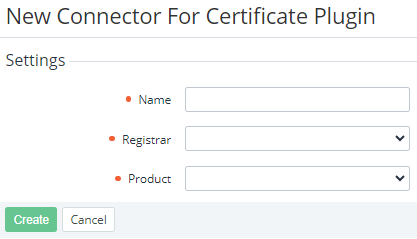
Click Next. The page for entering information about the connector is displayed.
-
In the Name field, enter the name of the connector.
-
In the Registrar list, select the previously created Certificate Reseller (see Managing Certificate Resellers).
-
In the Product list, select the type of the certificate for the selected Certificate Reseller.
-
Click Create. The new connector will be displayed in the list.