
To create a connector for a service that requires manual operations for provisioning:
-
Go to Connectors (see Navigation). The list of connectors is displayed (see Viewing the list of connectors).
-
Click Create. The New Connector page is displayed.
-
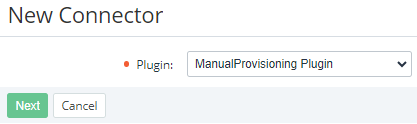
In the Plugin list, select ManualProvisioning Plugin.
-
Click Next. The page for entering information about the connector is displayed.
-
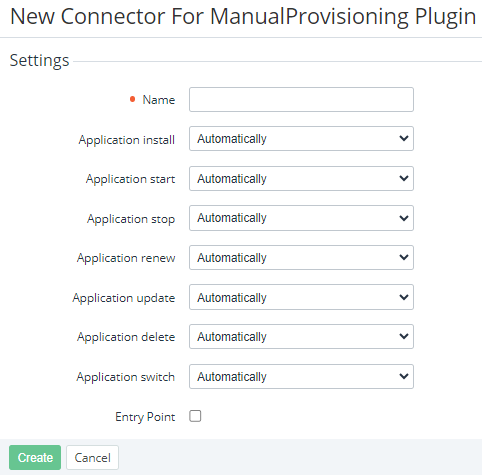
In the Name field, enter the name of the connector.
-
Using the following lists, select the required modes of the service provisioning actions:
-
Application install — installing an application instance.
-
Application start — starting an application instance.
-
Application stop — stopping an application instance.
-
Application renew — renewing an application instance.
-
Application update — updating an application instance.
-
Application delete — deleting an application instance.
-
Application switch — switching an application instance.
For every service provisioning action, the corresponding list includes the following options:
-
Automatically — a service provisioning action is performed automatically.
-
Manually — to complete a service provisioning action, a created manual operation must be approved by a manager (see Manual operations).
-
-
Skip the Entry Point settings. They are not used in the current version of the platform.
-
Click Create. The new connector is created and displayed in the list.