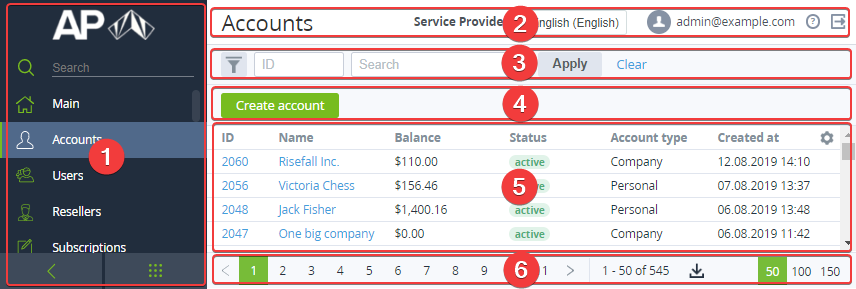
The standard page layout includes the following areas:
-
Navigation Bar (1) — see Navigation. It also includes the menu view switch buttons and the reseller logo as a link to the main page (see Main page).
-
Top bar (2):Page name.Reseller's name — the reseller of the current manager.The language menu to select a locale of the user interface.The email of the current manager as a link to the manager's details page (see Viewing and updating manager's information).The help button to access the Operation Control Panel guide.The sign-out button.
-
Workspace:Search bar (3) — allows configuring filters and use them for searching (see Searching and filtering).Toolbar (4) — includes the action buttons depending on the section.Lists of objects (5) — see Working with the list of objects. The list of objects is described in the corresponding sections of this guide.Page navigation bar (6) — allows configuring the number of rows displayed in the list of objects, navigating through the pages (see Page navigation), and exporting data to a file (see Exporting a list as a file).The workplace settings are stored for users individually.