
Before configuring the upgrade-to products, add switchable plans from different products (see Managing switchable plans).
The upgrade-to product is an upselling service that recommends customers "upgrade" their current subscription to a main product — switch to another plan of another product. In the recommendation service, you can only view the list of products available for upgrade and configure their display priority.
In this article:
View the list of upgrade-to products
To view the list of upgrade-to products:
-
Go to Product recommendations (see Navigation). The list of main products is displayed (see Product recommendations).
-
Click the ID or name of the required main product. The Featured products tab of the product's page in the recommendation service is displayed.
-
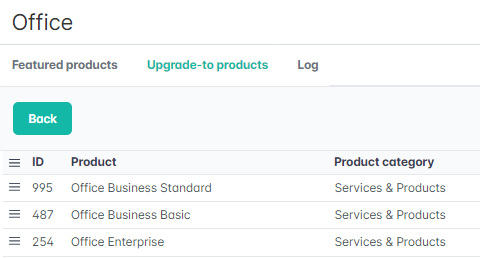
Go to the Upgrade-to products tab. The list of products is displayed with the following columns:
-
A column with checkboxes to manage featured products.
-
A column with a button to drag rows to manage the order in which featured products are displayed.ID — the unique identification number of an upgrade-to product.Product — the name of an upgrade-to product.Product category — the category that includes an upgrade-to product.
The list of upgrade-to products is automatically generated as follows:
-
For the selected main product, all active public plans are found (see Viewing the list of product plans).
-
For each plan found, all switchable plans are found, ignoring the Immediate/Delayed attribute (see Managing switchable plans) but with all of the following conditions met:Active.Public.With at least one sale or renew permission (see Plan information).
-
All unique public products associated with the found switchable plans are selected.
-
The main product itself is excluded from the list of products.
Configure the display priority of upgrade-to products
By default, the list is sorted by descending product ID, and their priority is not set. To change the order of recommendations for customers, hold down the 