
To view the list of currencies, go to Currencies (see Navigation).
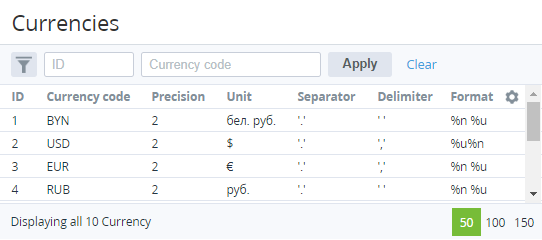
The list includes the following columns:
-
ID — the unique identifier of a currency in the platform.
-
Currency code — the unique three-letter alphabetic code (ISO 4217).
The ID and code of a currency are displayed as a link to the currency details page (see Viewing and updating a currency) only on the root reseller level. For all other resellers, currencies and their parameters are read-only. However, currency rates are available for editing in another section (see Managing currency rates).
-
Precision — the number of decimal places for currency subunits (for example, for cents, the precision is 2).
-
Unit — the displayed name for the currency units.
-
Separator — the decimal separator: dot or comma. Example of displaying: 99.99 or 99,99.
-
Delimiter — the separator for groups of thousands: space or comma. Example of displaying: 10 000 or 10,000.
-
Format — the display order of units and amount, where %n is an amount, and %u is units:%n %u. Example of displaying: 100 $%u %n. Example of displaying: $ 100%n%u. Example of displaying: 100$%u%n. Example of displaying: $100