
Only the root Reseller can manage Packages.
To view the List of Packages:
-
Sign in to the Operator Control Panel.
-
Go to
{base_url}/admin/aps/packageswhere{base_url}is the URL of ActivePlatform installation.
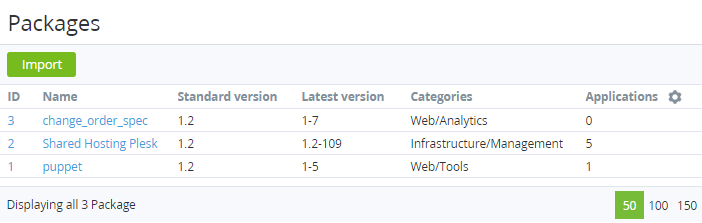
The Packages page displays the following blocks:
-
Top bar.
-
List of APS packages with the following columns:
ID — unique identification number of the Package.Name — Package name.Standard version — version of the Package that is used by default.Latest version — version of the Package that has been download at last time.Categories — category of the Package.Application — number of application's instances that are based on this Package.