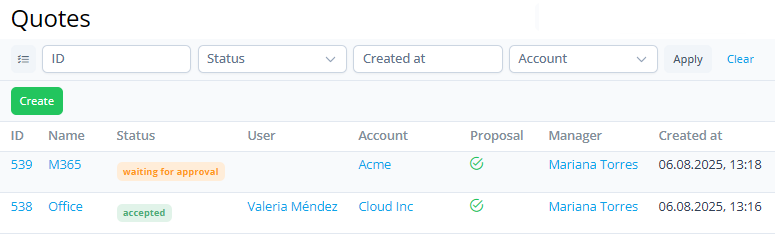
To view the list of requests for quote, go to Quotes (see Navigation).
The list includes the following columns:
-
ID — the unique identification number of a request for quote as a link to its page (see Viewing quote details).
-
Name — the name of a request for quote as a link to its page.
-
Status — the current status of a request for quote:
-
Pending — the request is received, but the proposal hasn’t been prepared yet.
-
Waiting for approval — the manager prepared and sent a proposal, and is waiting for the customer's response.
-
Declined — the proposal is rejected by the customer or manager.
-
Accepted — the customer accepted the proposal.
-
Expired — the customer didn’t respond within the specified time, and the proposal is no longer valid.
-
Canceled — the request was canceled by the customer or manager before a proposal was prepared.
-
-
User — the name of the customer user who created the request. This field is empty if the request was created by a manager.
-
Account — the name of the linked account as a link to its page (see Viewing and updating account's details).
-
Proposal — a marker indicating that a proposal has been prepared and sent to the customer.
-
Manager — the name of the manager who prepared the proposal.
-
Created at — the date and time when a request for quote was created.