
To view the list of TLDs:
-
Sign in to the Operator Control Panel.
-
On the Navigation Bar, go to TLDs (see Navigation). The list of TLDs is displayed.
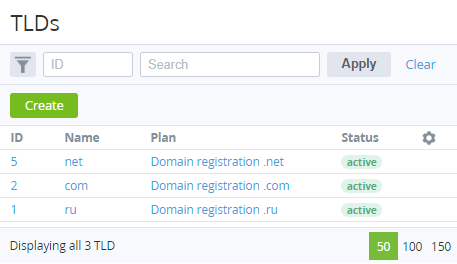
The TLDs page consists of the following blocks:
-
Top bar.
-
List of TLDs with the following columns:
-
ID — unique identification number of the TLD.
-
Name — TLD name.
-
Plan — Plan that is used for registration Domains in this TLD.Status — current status of TLD: inactive — not available for registration and is not displayed in the Customer Control Panel.active — available for registration and is not displayed in the Customer Control Panel.