
The notification log stores all notifications sent to managers and account users (see Notification configuration).
To view the notification log, go to Notifications Log (see Navigation).
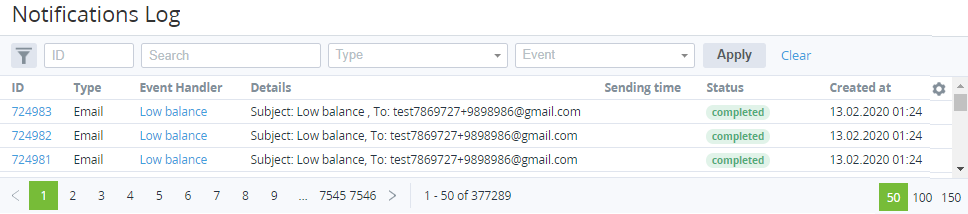
The notification log includes the following columns:
-
ID — the unique identification number of a notification.
-
Type — the notification type: SMS, Email, or Customer Control Panel.
-
Event Handler — the event handler generated a notification (see Creating an event handler).
-
Details — detailed information about a notification.
-
Sending time — the date and time when a notification in the sending queue will be sent. If a notification was sent immediately, the Sending time is empty.
-
Status — the status of a notification:
-
Generation error — a notification is generated but not sent. The platform found an error in the notification content, such as:
-
Liquid error for one of the placeholders (see Placeholders used in notification templates for specific event handlers).
-
The resource consumption storage is not available.
-
For a Billing day for account's subscription has come event, there is no data to fill in the consumption report according to its template (Creating an event handler).
-
A placeholder in the To field of an email notification template (see Creating an email template) returned an incorrect email (for example, nil, if
account.manager.emailis used but an account does not have a manager). -
All recipients of an email notification specified with placeholders are inactive. For details, see Additional settings in Creating an email template.
-
A placeholder in the From Email of an email notification template returned an incorrect email (see Additional settings in Creating an email template).
-
-
Waiting for sending — a notification is generated but postponed until the sending time.
-
Sending failed — an error occurred during the sending process.
-
Sending.
-
Completed — a notification is sent.
-
-
Created at — the date and time when a notification was created.