
For navigation through the sections of the Operator Control Panel, the left-side menu is used.
In this article:
Menu display modes
The menu has three display modes:
-
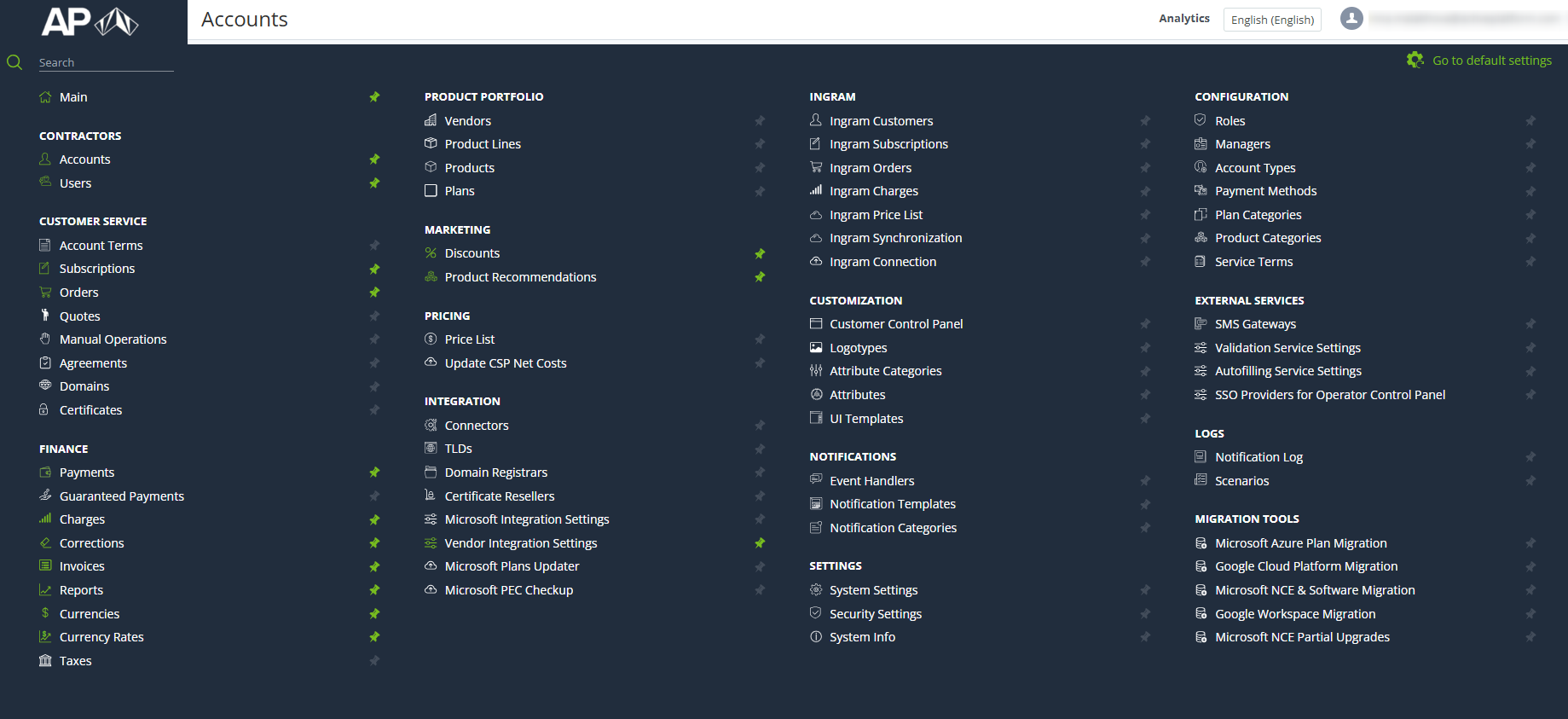
The full menu that contains the full list of sections available to the current manager (see Managers' roles).
-
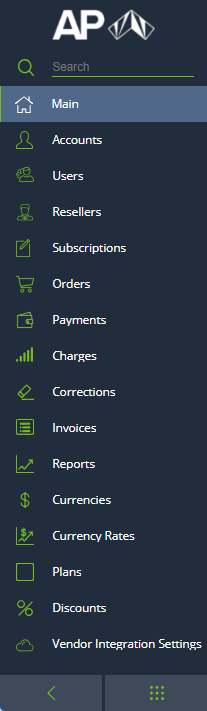
The standard menu that contains only selected sections.
-
The compact menu that contains the pictograms of the selected sections.
You can switch between the display modes using the buttons under the menu.
Full menu
The full menu contains the following elements:
-
The reseller logo as a link to the main page (see Main page).
-
Menu sections search.
-
Links to the platform sections in groups. Each link includes an icon and the section name (see also Menu sections vs Guide sections).
-
The buttons that allow a manager to pin and unpin a section in the standard and compact menu.
-
To pin a section, click

-
To unpin a section, click

-
-
The

Standard menu
The standard menu includes the following elements:
-
-
The reseller logo as a link to the main page (see Main page).
-
Menu sections search.
-
Links to the platform sections. Each link includes an icon and the section name.
-
The

button that allows a manager to switch to the compact menu.
-
The

button that allows a manager to switch to the full menu.
-
Compact menu
The compact menu includes the following elements:
-
A logo with the first letter of the reseller name as a link to the main page (see Main page).
-
The icons of the menu sections. Each icon is a link to the corresponding section. To view a hint with the section name, hover the mouse pointer over an icon.
-
The


Menu sections search
Menu sections search is available in the standard and full menu. To find a section, start entering letters of its name in the Search field. The search results are displayed under the field.
When searching for a section in the standard menu, both pinned and unpinned sections appear in the results.
Menu sections vs Guide sections
|
Menu section |
Guide section |
|
|---|---|---|
|
Main |
||
|
Contractors |
— |
|
|
|
Accounts |
|
|
|
Users |
|
|
|
Resellers |
|
|
Customer Service |
— |
|
|
|
Account Terms |
|
|
|
Subscriptions |
|
|
|
Orders |
|
|
|
Quotes |
|
|
|
Manual Operations |
|
|
|
Agreements |
|
|
|
Domains |
|
|
|
Certificates |
|
|
Finance |
— |
|
|
|
Payments |
|
|
|
Guaranteed Payments |
|
|
|
Charges |
|
|
|
Corrections |
|
|
|
Invoices |
|
|
|
Reports |
|
|
|
Currencies |
|
|
|
Currency Rates |
|
|
|
Taxes |
|
|
Product Portfolio |
— |
|
|
|
Vendors |
|
|
|
Product lines |
|
|
|
Products |
|
|
|
Plans |
|
|
|
Storefront |
|
|
Marketing |
— |
|
|
|
Discounts |
|
|
|
Product recommendations |
|
|
Pricing |
— |
|
|
|
Price List |
|
|
|
Update CSP Net Costs |
See Updating the net costs of the Resources of the Microsoft Office 365 Plans in the Services. Operator Guide |
|
Integration |
— |
|
|
|
Connectors |
|
|
|
TLDs |
|
|
|
Domain Registrars |
|
|
|
Certificate Resellers |
|
|
|
Microsoft Integration Settings |
|
|
|
Vendor Integration Settings |
|
|
|
Microsoft Plans Updater |
|
|
|
Microsoft PEC Checkup |
|
|
Customization |
||
|
|
Operator Control Panel |
|
|
|
Customer Control Panel |
|
|
|
Logotypes |
|
|
|
Attribute Categories |
|
|
|
Attributes |
|
|
|
UI Templates |
|
|
Notifications |
— |
|
|
|
Event Handlers |
|
|
|
Notification Templates |
|
|
|
Notification Categories |
|
|
Settings |
— |
|
|
|
Global Settings |
|
|
|
System Settings Template |
|
|
|
System Settings |
|
|
|
Security Settings |
|
|
|
System Info |
|
|
Configuration |
— |
|
|
|
Roles |
|
|
|
Managers |
|
|
|
Account Types |
|
|
|
Payment Methods |
|
|
|
Plan Categories |
|
|
|
Product Categories |
|
|
|
Service Terms |
|
|
External Services |
— |
|
|
|
Payment Gateways |
|
|
|
SMS Gateways |
|
|
|
Validation Service Settings |
|
|
|
Autofilling Service Settings |
|
|
|
Currency Exchange Rates Updater |
|
|
|
SSO Providers for Operator Control Panel |
|
|
Logs |
— |
|
|
|
Notifications Log |
|
|
|
Tasks |
|
|
|
Scenarios |
|
|
Migration Tools |
— |
|
|
|
Microsoft Azure Plan Migration |
See Migrating Microsoft Azure Plan subscriptions in the Services. Operator Guide |
|
|
Google Cloud Platform Migration |
See Migrating Google Cloud Platform subscriptions in the Services. Operator Guide |
|
|
Microsoft NCE & Software Migration |
See Migrating Microsoft NCE subscriptions and Migrating Microsoft Software subscriptions in the Services. Operator Guide |
|
|
Google Workspace Migration |
See Google Workspace. Subscription migration wizard in the Services. Operator Guide |
|
|
Microsoft NCE Partial Upgrades |
See in the Services. Operator Guide |