
Product recommendations are an upselling service based on connections between products. Customers see the recommended products in a widget on the main page of the Customer Control Panel and a detailed subscription page. To configure the widget, see Recommendations in Configuring the Customer Control Panel appearance.
To configure recommendations for a product:
-
Go to Product recommendations (see
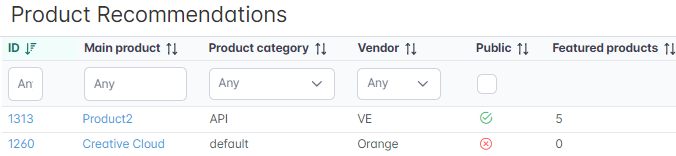
Navigation). The list of main products is displayed. It contains all products of the reseller (see
Viewing the list of products) and includes the following columns and filters:
-
ID — the unique identification number of a main product. It is displayed as a link to the product's page in the recommendation service.
-
Main product — the name of a main product. It is displayed as a link to the product's page in the recommendation service.
-
Product category — the category that includes a main product.
-
Vendor — the name of a vendor that owns a main product.
-
Public — indicates whether a main product is available for sale.
-
Featured products — the number of products added to a main product as featured.
-
-
Click the ID or name of the required main product. The product's page in the recommendation service is displayed.
-
Go to the required tab:
-
Featured products (default) — a list of featured products of this product. For further steps, see Featured products.
-
Upgrade-to products — a list of products linked to switchable plans of all plans of this product. For further steps, see Upgrade-to products.
-
Log — the history of changes of the product recommendations (see Viewing an object log).
-
Recommendations based on the links between add-ons and prerequisite plans are configured on the plan page (see Managing prerequisite plans).