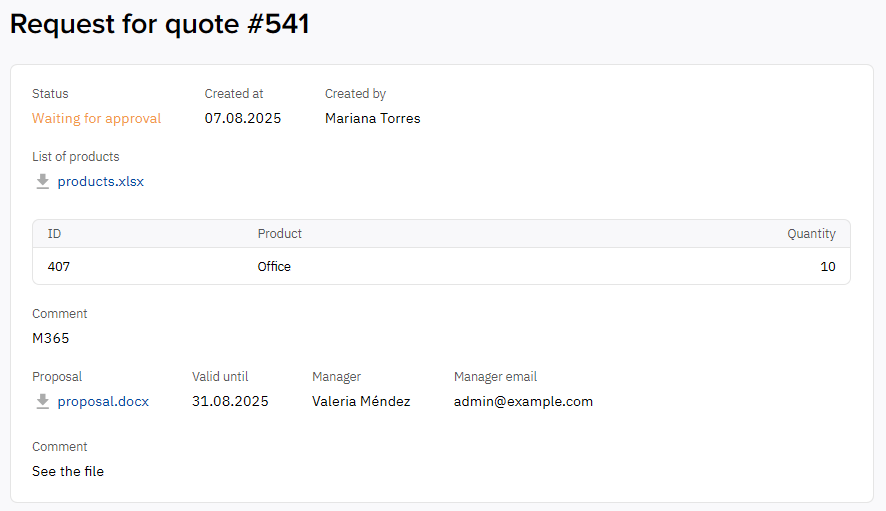
To view detailed information about a request for quote:
-
In the navigation menu, select Quotes. A list of all requests associated with your account is displayed (see View the list of quotes).
-
Click the ID or name of the relevant request. The request details page is displayed the request name and the following elements:
-
-
Status — the current status of the request for quote:
Unable to render {include} The included page could not be found. -
If a proposal sent in response to the request was accepted:Approved at — the date the proposal was accepted.Approved by — the name of the account user who accepted it.
-
If a proposal was declined:Declined at — the date the proposal was declined.Declined by — the name of the account user who declined it. If the proposal was declined by the reseller, no name is shown.
-
Created at — the date when the request was created (see Create a quote).
-
Created by — the name of the account user who created the request. If the request was created by the reseller, no name is shown.
-
Product list — a link to the attached file (if available) and a table of products selected from the catalog (see Catalog):
-
ID — the product ID.
-
Product — the product name.
-
Quantity — the requested quantity.
-
-
Comment — the text of the request (if provided).
-
If the reseller’s manager sent a proposal in response to the request:Proposal — a link to the proposal file.Valid until — the date until which you can accept the proposal.Manager — the name of the manager who sent the proposal.Manager email — the email of the manager who sent the proposal.Comment — additional information about the proposal provided by the manager.
-
Action buttons — shown depending on the request status. For details, see Accept or decline a proposal and Cancel a quote.
-