
To generate promo codes for a discount:
-
Go to Discounts. The list of discounts is displayed (see Viewing the list of discounts).
-
Click the ID or name of the required Promo Code discount. The discount details page is displayed (see Viewing and updating discount details).
-
Go to the Promo Codes tab. The list of promo codes of the selected discount is displayed (see Viewing the list of promo codes).
-
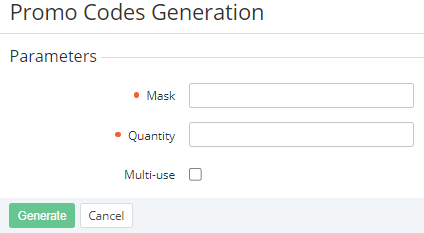
Click Generate Promo Codes. The Promo Codes Generation page is displayed.
-
In the Mask field, enter a template for the promo codes using the following format:%N where N is the number of characters in a promo code (minimum 6).Additional characters you want to use as part of a promo code.Example: The mask CODE%5PROMO allows generating promo codes that are started from CODE, followed by five random characters, and ended by PROMO.
-
In the Quantity field, enter the number of promo codes you need to generate.
-
If it is necessary that all the promo codes can be used more than once, select the Multi-use checkbox.
Multi-use promo codes require Subscription limit > 1 in the subscription settings (see details in Creating a Promo Code discount).
-
Click Generate. The promo codes will be generated and displayed in the list.