
To edit SEO information of a category page:
-
Go to Storefront (see Navigation). The General tab of the Customer Store Control Panel is displayed (see Customer Store general settings).
-
Go to the Categories tab. The list of category pages is displayed (see Viewing category pages list).
-
Click the name of the required category. The category details page is displayed.
-
In the Category page SEO information section, add or change the following information:
There are character limits for some fields on this page:
-
Title: 128 characters.
-
Meta description, Meta keywords: 256 characters.
-
In the Title field, enter the title of the category page for SEO optimization.
-
In the Meta description field, enter the description of the category page for SEO optimization.
-
In the Meta keywords field, enter the category page keywords list for SEO optimization.
-
-
Click Update.
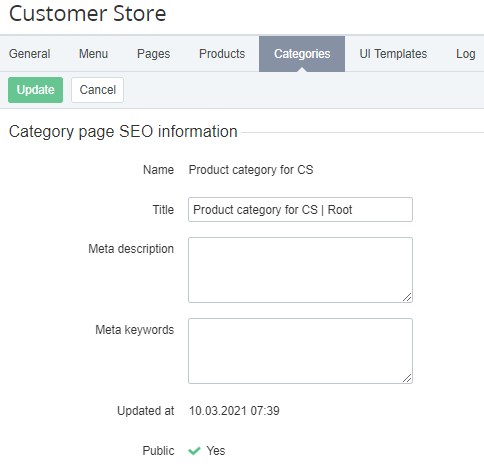
The Public attribute indicates whether a category is displayed in Storefront. To change the Public attribute, see Viewing and updating a product category.