
To view the details of an invoice for the Postpay model:
-
Go to Invoices (see Navigation). The list of invoices is displayed (see Viewing the list of invoices).
-
If it is necessary, filter the list of invoices by account type. The filter is available, but the corresponding column is absent in the list.
-
Click the ID or number of the required invoice with Payment model = Postpay. The invoice details page is displayed. The page includes the following groups:
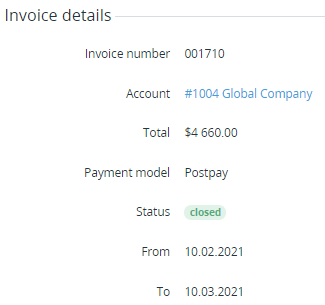
Invoice details
In the Invoice details group:
-
Invoice number — the number of the invoice. The invoice number format can be configured in the system settings (see General system settings).
-
Account — the name of the account to which the invoice is issued.
-
Total — the amount of the invoice in the platform in the reseller currency, taking into account the charges and corrections. Total does not depend on External total.
-
External total — if managing invoices for the Postpay model by a third-party ERP system is activated (see Managing invoices for the Postpay model by a third-party ERP system), may display the amount and currency of a third-party invoice after the invoice approval. See also Viewing payment details.
-
Approval date — displayed if managing invoices for the Postpay model by a third-party ERP system is activated (see Managing invoices for the Postpay model by a third-party ERP system), and the invoice is approved.
-
Payment model — Postpay.
-
Status:
Open — the invoice is created, but not yet issued to an account because the billing period is not ended.Closed — the invoice is closed. Invoices are closed on the second day of the next billing period. Closed invoices are issued to accounts. -
From — a billing day with the start date of the covered period.
-
To — a billing day with end date of the covered period.
Charges
Charges — a table with the list of charges included in the invoice:
-
# — the serial number of a charge in the invoice.
-
Description — the detailed information about a charge.
-
Quantity — the quantity of the service or resource units (up to three decimal places).
-
Duration — the covered period in months (except for subscription to plans with the Pay as you go (external) billing type).
-
Unit price — the unit price of a service or resource (except for subscription to plans with the Pay as you go (external) billing type).
-
Discount — the amount of the applied discount (see Managing discounts).
-
Taxes — the amount of taxes applied to a charge when it was created (see Managing taxes).
-
Amount — the amount of a charge.

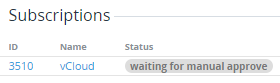
Subscriptions
Subscriptions — a table with the list of subscriptions that have charges closed during the previous billing period:
-
ID — the unique identification number of a subscription.
-
Name — the name of a subscription.
-
Status — the current status of a subscription.
Payments
Payments — a table with the list of payments linked to the invoice. Payments are displayed only after the invoice gets the Closed status. The table includes the following information:
-
ID — the unique identification number of a payment.
-
Description — the description of a payment with its number in the platform (see General system settings).
-
Created at — the date of the payment creation.
-
Due date — the latest date for completing a payment. On the next day, if not completed, it gets the Expired status (see Payment for rendered services).
-
Status — the current status of a payment (see Payment types).
-
Amount — the amount of a payment, taking into account the corrections.

Correction
Correction — table with the list of corrections (see Managing corrections) included in the invoice (if any) that contains the following columns:
-
# — the serial number of a correction in the invoice.
-
Description — the detailed information about a correction.
-
Current Debt Changed — the amount of a correction:The down-pointing triangle ▼ and the "-" sign are displayed if a negative correction is created (the current debt is reduced using the correction).The up-pointing triangle ▲ is displayed if a positive correction is created (the current debt is increased using the correction).
-
Approved at — the date and time when a correction is approved by a manager.

Taxes
Taxes — a table with the list of taxes. The table is displayed, if a manager added at least one tax for a charge included in the invoice (for details, see Adding taxes for Charges in Postpay model):
-
# — the serial number of a tax in the invoice.
-
Name — the tax name.
-
Description — the tax description and additional information.
-
Amount — the tax amount. A negative tax value is a refund, and it is deducted from the charge amount. A positive total tax value is added to the charge amount.