Viewing reseller subscriptions
To view the list of subscriptions sold by a reseller and its downstream resellers on all levels below:
-
Go to Resellers (see Navigation). The list of resellers is displayed (see Viewing the list of resellers).
-
Click the ID or name of the required reseller. The General tab of the reseller details page is displayed (see Managing reseller's information).
-
Go to the Reseller Subscriptions tab. The list of subscriptions is displayed.
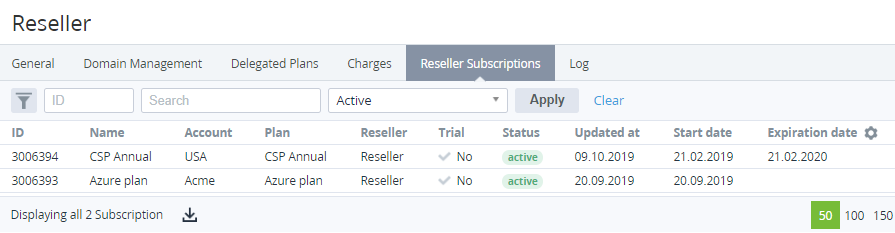
The list includes the following columns:
-
ID — the unique identification number of a subscription.
-
Name — the subscription name.
-
Account — the account name.
-
Plan — the plan name.
-
Reseller — the reseller name.
-
Trial — the type of subscription:Yes — a subscription to a free trial period.No — a subscription to a paid commercial period.
-
Status — the subscription status.
Subscription statuses
-
Ordered — a new subscription is ordered and waits for the activation.
-
Active — a subscription is used.
-
Delivered — a subscription with the Non-recurring Subscription billing type is used.
-
Graced — a customer did not pay for a subscription on time, and after the grace period, a subscription will be stopped.
-
Stopped — a subscription is temporarily stopped.
-
Deleted — a subscription is permanently deleted.
-
Installation failed (installation_failed — in the API methods) — an error occurred during the installation of the ordered service.
-
Activation failed (activation_failed) — an error occurred during the subscription activation process.
-
Renewing failed (renewal_failed) — an error occurred during the subscription renewal process.
-
Updating failed (updating_failed) — an error occurred during the resource update process.
-
Stopping failed (stopping_failed) — an error occurred during the subscription stopping process.
-
Deletion failed (deletion_failed) — an error occurred during the subscription deleting process.
-
Switching failed (switching_failed) — an error occurred during the subscription plan switching process.
-
Installing — the ordered service is installing.
-
Activating — a subscription is activating.
-
Renewing — a subscription is renewing.
-
Updating — a subscription resource is updating.
-
Stopping — a subscription is stopping.
-
Deleting — a subscription is deleting.
-
Switching — the plan of a subscription is switching.
-
Waiting for manual approve (waiting_for_manual_approve) — the operation with a subscription waits for approval by a manager (see Manual Operations) due to the stop subscription and delete subscription modes set in the account class of the account (see Creating an Account Class).
-
Blocked — a postpaid subscription is stopped due to an expired payment.
-
Updated at — the date when information about a subscription is updated.
-
Start date — the activation date of a subscription.
-
Expiration date — the expiration date of a subscription.
