
To view the list of accounts, go to Accounts (see Navigation).
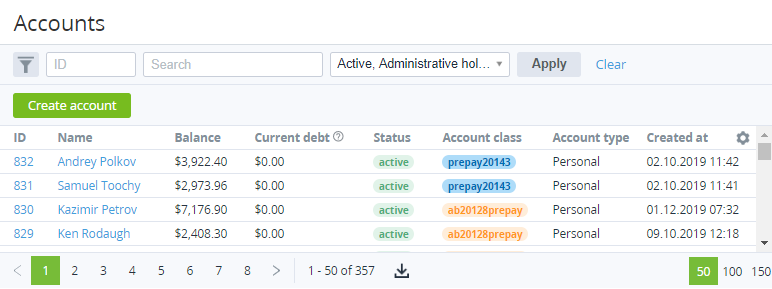
The Accounts page includes the following groups:
-
The search bar (see Searching and filtering). Filtering is available by any column and by the following attributes:Manager — filtering by a manager linked to accounts (see Staff management).Financial blocking threshold — filtering by a range of which the account balance can be negative without moving an account to the Credit hold status (see Credit hold of the account).
-
The list of accounts with the following columns:
-
ID — the unique identification number of an account.
-
Name — the name of an account.
-
Balance — the current value of the account balance.
-
Current debt — the total debt for all postpaid subscriptions in the current financial period, excluding payments issued for the previous financial period.
-
Status — one of the following account statuses:
-
Active — an account can order and manage subscriptions.
-
Administrative hold — an account is blocked manually by a manager (see Moving an account to the administrative hold).
-
Credit hold — an account is blocked automatically due to a debt on the account balance (see Credit hold of the account). The terms of the credit hold are set in an account class (see Account classes).
-
Deleted — an account is deleted manually by a manager (see Deleting an account).
-
-
Account class — the account class (see Account classes).
-
Account type — the account type (see Account types).
-
Created at — the date and time when an account is created.
-
Country — the country specified in the account address information (see Contact information in Viewing and updating account's details).
-
City — the city specified in the account address information.
-
Phone — the phone number specified in the account address information.
-
Owner — the full name of the Owner of an account (see Contact person in Viewing and updating account's details).
-
Owner email — the email address of the Owner of an account.
-
Self-registration — indicates whether an account is created by completing the self-registration process in the Customer Control Panel (see Quick and full registration) or by a manager via the Operator Control Panel (see Creating an account). By default, the column is not displayed.
-
Work permit for postpaid — the permission of an account to order postpaid subscriptions (only commercial or trial, too — depending on the settings). The column is displayed when manual approval from the manager is required to order postpaid subscriptions (Allow an account to order a postpaid subscription = Manually is selected in the reseller settings (see General system settings)). The possible values (see Managing account's permission to use the Postpay model):
-
-
Verification not performed — an account did not order postpaid subscriptions when manual approval from a manager was expected.
-
Approval required — an account attempted to order the first postpaid subscription when manual approval from a manager was expected. The account is under review by its manager.
-
Declined — a manager denied an account to order postpaid subscriptions.
-
Approved — a manager allowed an account to order postpaid subscriptions on the account creation (see Creating an account) or after the account attempted to order the first postpaid subscription.
-
-
Additional attributes created for the account entity (see Viewing the list of attributes). By default, these columns are not displayed.
-