
To view the list of custom attributes:
-
Go to Attributes (see Navigation). The list of custom attributes is displayed.
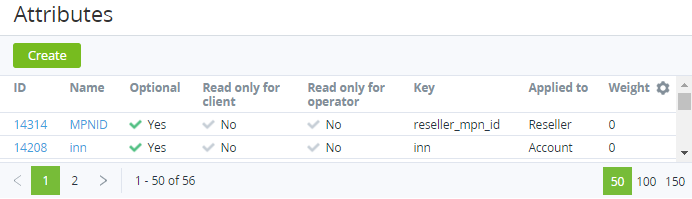
The list of custom attributes includes the following columns:
-
ID — the unique identification number of a custom attribute.
-
Name — the name of a custom attribute.
-
Optional — indicates whether a custom attribute is optional.
-
Read only for client — indicates whether a custom attribute cannot be edited in the Customer Control Panel for a created entity.
-
Read only for admin — indicates whether a custom attribute cannot be edited in the Operator Control Panel for a created entity.
-
Key — the key used to refer to a custom attribute by API or a placeholder (see Managing event handlers).
-
Applied to — the entity type to which a custom attribute is applied:Account.User.Plan.Manager.Reseller.Resource.
-
Weight — the value that defines the display order of custom attributes on a page. The higher is the number, the lower is the position on the page.