
To view the list of products in a product category:
-
Go to Product Categories (see Navigation). The list of product categories is displayed (see Viewing the list of product categories).
-
Click the ID or name of the required product category. The product category details page is displayed (see Viewing and updating a product category).
-
Go to the Products tab. The list of products of the selected product category is displayed.
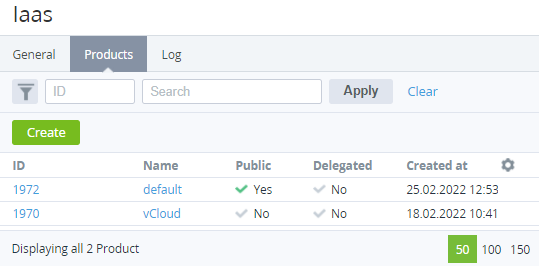
The list of products includes the following columns:
-
ID — the unique identification number of a product.
-
Name — the name of a product.
-
Public — indicates whether a product is available for sale.
-
Delegated — indicates whether a product is delegated by the upstream reseller (see Managing Resellers).
-
Created at — the date and time of the product creation (see Creating a product).