To view and update the user details:
-
Go to Users (see Navigation). The list of users is displayed (see Viewing the list of users).
-
Click the ID or name of the required user. The user details page is displayed with the following tabs:
-
General — includes the following groups:
On the General tab, the following operations are also available:
-
Accounts — the list of attached accounts (see Viewing the list of accounts).
-
Login History — the history of the user sessions in the Customer Control Panel, similar to an object log (see Viewing an object log). The login history also stores entries about acceptance of the Privacy Policy, which include the email and IP address of the user (or a manager) and can be filtered as Action = Agreement.
-
-
If it is necessary to update the user details:
-
On the General tab, update the information available for editing.
-
Click Update to save the changes.
-
User information
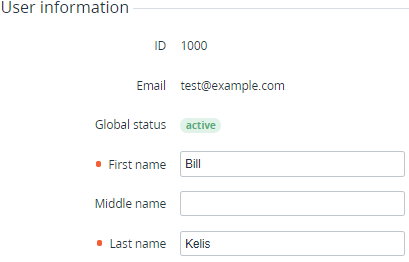
In the User information group::
-
ID — the unique identification number of the user.
-
Email — the user email that is used as the login.
-
Global status — the user status in the platform for all attached accounts: Active or Inactive.
-
First name, Middle name, and Last name — the full name of the user.
-
Information about the user based on custom attributes, if any (see Managing attributes).
Agreements
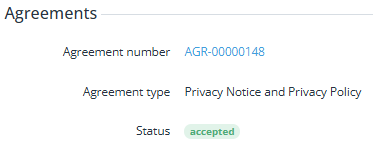
In the Agreements group, you can view information about the user’s agreements (see Agreements):
-
Agreement number — the number of the agreement, shown as a link to its details page (see Viewing agreement details).
-
Agreement type:
-
Privacy Notice and Privacy Policy — an agreement between the reseller and the customer’s user.
-
-
Status — the status of the agreement:
-
Accepted — the agreement has been accepted.
-
Waiting for accept — the agreement has been created or an update has been requested, but it has not yet been accepted.
-