
To view the list of service terms, go to Service Terms (see Navigation).
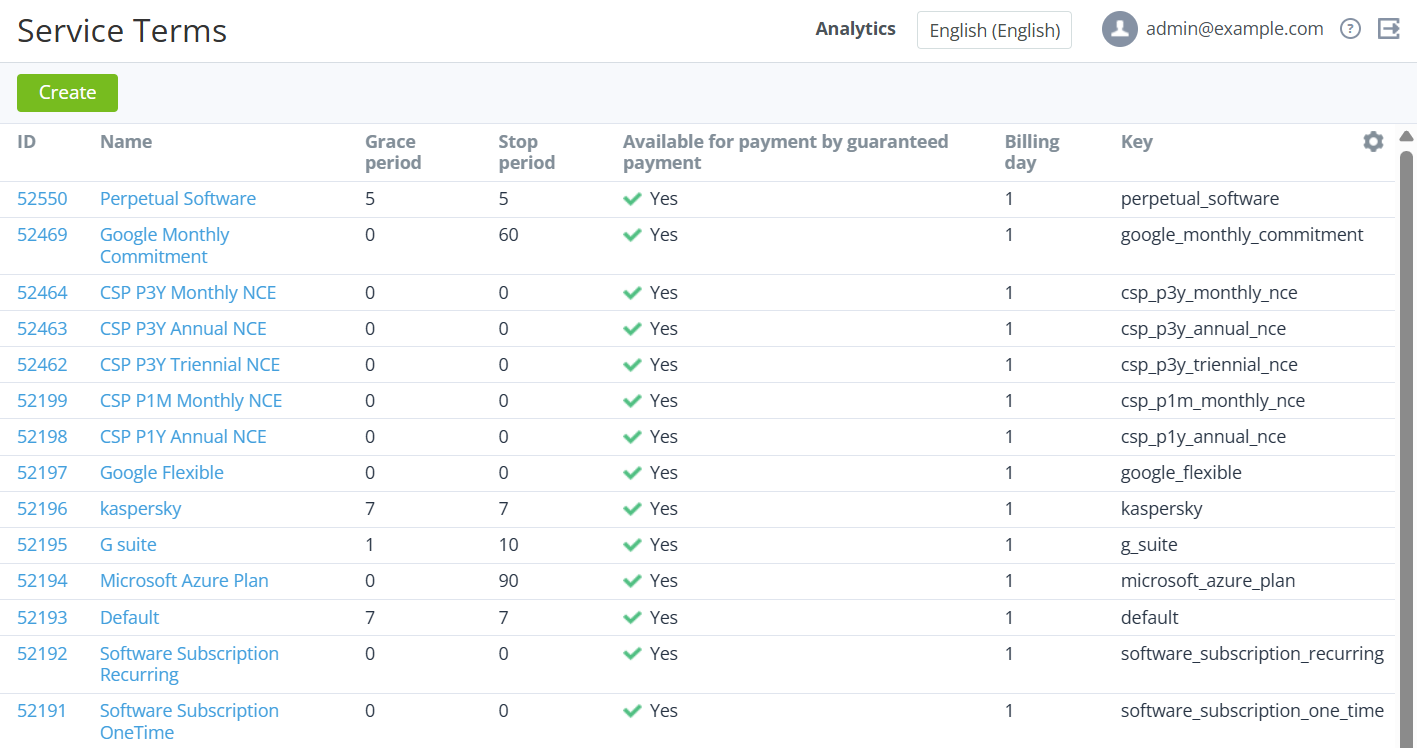
The list includes the following columns:
-
ID — the unique identification number of a service term.
-
Name — the name of a service term.
-
Stop subscription type (not displayed by default) — indicates how subscriptions are stopped, except for the manual stopping (see Stopping a subscription) and moving an Account to the Credit Hold (see Credit hold of the account):
-
Automatically — subscriptions are stopped automatically.
-
Manually — subscriptions are stopped after approving manual operations by a manager (see Manual operations).
-
-
Delete subscription type (not displayed by default) — indicates how subscriptions are deleted:
-
Automatically — subscriptions are deleted automatically.
-
Manually — subscriptions are deleted after approving manual operations by a manager (see Manual operations).
-
-
Grace period — the number of days after the end of the subscription period during which a subscription continues working without paying for a renewal order.
-
Stop period — the number of days after the Grace period when a subscription remains stopped without deleting. The subscription is deleted when this period ends.
-
Available for payment by guaranteed payment — indicates whether customers can pay with guaranteed payments for subscriptions to the linked plans (see Managing guaranteed payments).
-
Billing day — the day of the month when charges (see Charges) change their statuses.
-
Key — the unique key of a service term used for data synchronizing.