
You can create a connector resource if it is supported by a plugin — for example, for connectors based on the Vendor Service Plugin (VSP).
For creating connector resources of Microsoft services based on the MicrosoftCspProducts plugin, see ActivePlatform. Services. Operator documentation.
To create a connector resource:
-
Go to Connectors (see Navigation). The list of connectors is displayed (see Viewing the list of connectors).
-
Click the ID or name of the required connector. The connector details page is displayed (see Viewing and updating connector details).
-
Go to the Resources tab. The list of connector resources is displayed (see Viewing the list of connector resources).
-
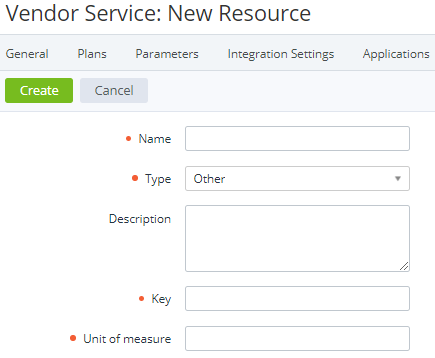
Click Create. The new resource page is displayed.
-
In the Name field, enter the name of the connector resource.
-
In the Type list, select the connector resource type:Users — a connector resource with the users key.Domain — a connector resource with the domains key.Other (default) — a connector resource with a custom key.
-
Optionally, in the Description field, enter additional information about the connector resource.
-
If the Other type is selected, in the Key field, enter the unique key of the connector resource.
-
In the Unit of measure field, enter units of the connector resource. For example, pc.
-
Click Create. The connector resource will be created and displayed in the list.