
To view the correction details:
-
Go to Corrections (see Navigation). The list of corrections is displayed (see Viewing the list of corrections).
-
Click the ID of the required correction. The correction details page is displayed.
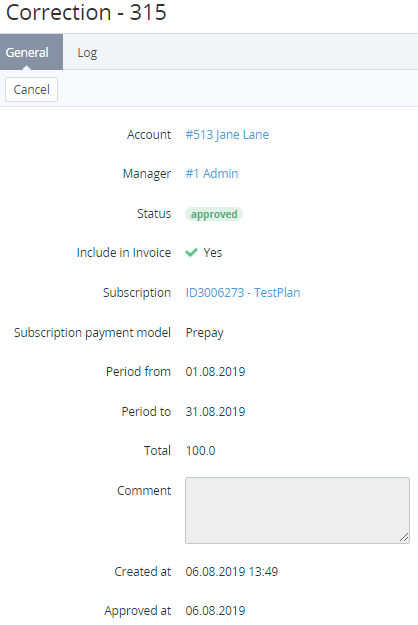
The correction details page includes the following tabs:
-
General — information about the correction:
-
Account — the name of the account linked to the correction.
-
Manager — the manager created a correction.
-
Status — one of the following correction statuses.
Approval required — a new correction is created.Approved — a correction is approved.Declined — a correction is declined. -
Include in Invoice — indicates whether the correction is included in an invoice. For corrections included in an invoice, the following additional elements are displayed:Subscription — a link to the subscription details page specified during the correction creation.Subscription payment model — Postpay or Prepay.Period from and Period to — the period related to the correction.The period is used only to inform the customer and does not affect in which invoice the correction will be included. A correction is always included in an invoice for the billing period in which it was approved (see Approving a correction).
-
Total — the amount of the correction. If the correction is linked to a postpaid subscription, it changes the current debt for this subscription rather than the account balance.
-
Comment — additional information about the correction.
-
Created at — the date and time when the correction is created.
-
Approved at — the date and time when the correction is approved by a manager. For corrections in the Approved status only.
-
-
Log — the history of the correction changes (see Viewing an object log).