
To view the list of notification categories, go to Notification Categories (see Navigation).
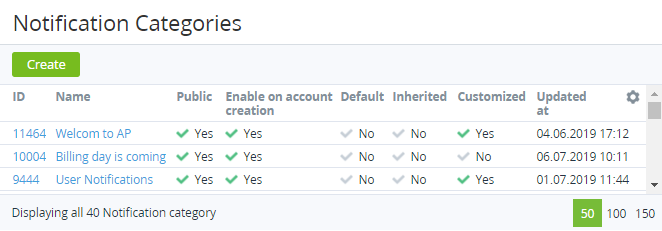
The list of notification categories includes the following columns:
-
ID — the unique identification number of a notification category.
-
Name — the name of a notification category.
-
Public — indicates whether a notification category can be configured in the Customer Control Panel (see ).
-
Enable on account creation — indicates whether a notification category is turned on for new accounts by default.
-
Default — indicates whether a notification category is installed by default:
-
Yes — for the operator only.
-
No — a notification category is inherited or created by a manager of the reseller (see Reseller's settings inheritance).
-
-
Inherited — indicates whether a notification category is delegated from the upstream reseller.
-
Customized — indicates whether a notification category is edited by a manager of the reseller (see
Viewing and updating notification category's details):
-
Yes — a notification category is edited by a manager of the reseller.
-
No — in the following cases:
-
A new notification category is created by a manager of the reseller (not inherited).
-
The state of an inherited notification category equals the state of the corresponding notification category of the upstream reseller (see Reverting the state of delegated notification category).
-
-
-
Updated at — the date and time when a notification category is created or edited.