
To view the list of requests for quote, go to Quotes (see Navigation).
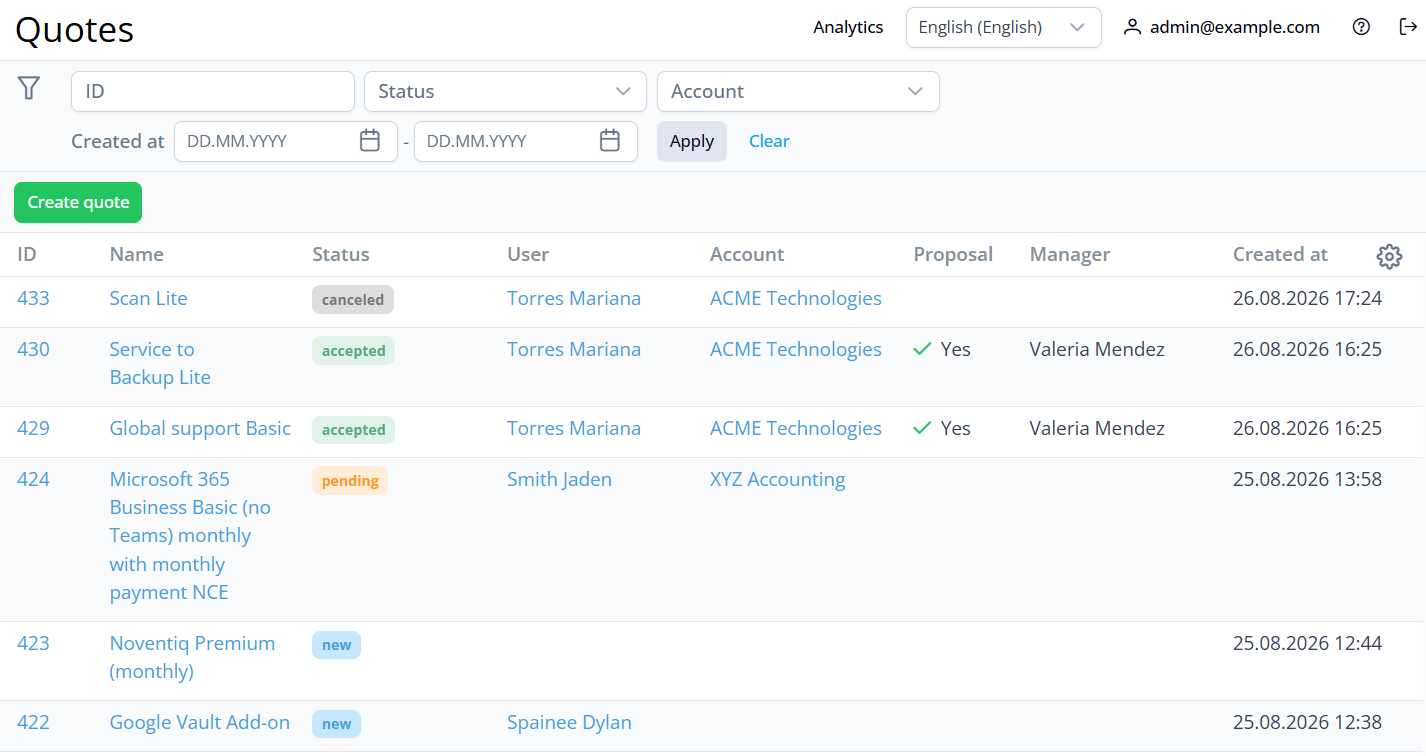
The list includes the following columns:
-
ID — the unique identification number of a request for quote as a link to its page (see Viewing quote details).
-
Name — the name of a request for quote as a link to its page.
-
Status — the current status of a request for quote:
-
New - the request is created by a user not registered in the Customer Control Panel or by a registered user not associated with an account.
-
Pending - the request is received, but the proposal hasn’t been prepared yet.
-
Waiting for approval - the manager prepared and sent a proposal, and is waiting for the customer’s response.
-
Declined - the proposal is rejected by the customer or manager.
-
Accepted - the customer accepted the proposal.
-
Expired - the customer didn’t respond within the specified time, and the proposal is no longer valid.
-
Canceled - the request was canceled by the customer or manager before a proposal was prepared.
-
-
User — the name of the customer user who created the request.
This field can be empty if the request was created by a manager or by an unregistered user. -
Account — the name of the linked account as a link to its page (see Viewing and updating account's details).
This field can be empty if the request was created by an unregistered user or a registered user not associated with an account. -
Proposal — a marker indicating whether a proposal has been prepared and sent to the customer.
-
Manager — the name of the manager who prepared the proposal.
This field can be empty if the request was created by an unregistered user or a registered user not associated with an account. -
Created at — the date and time when a request for quote was created.