
The customers closed charges report includes charges (see Charges) that got the Closed status during the selected period.
To create the customers closed charges report:
-
Go to Reports (see Navigation). The Sales Reports page is displayed.
-
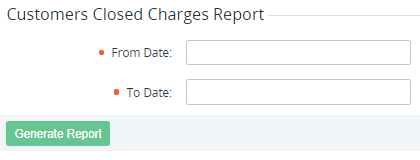
In the Customers Closed Charges Report group, in the From Date and To Date fields, set the period of the report.
-
Click Generate Report. The report will be sent to your email in the MS Excel format.
The report includes the following information:
-
Account ID — the unique identification number of the account (see Managing accounts), to which the charge relates.
-
Account Name — the name of the account, to which the charge relates.
-
Account Class ID — the unique identification number of the account class (see Account classes).
-
Account Class Name — the name of the account class.
-
Manager ID — the unique identification number of the manager (see Staff management), to which the account relates.
-
Manager — the name of the manager, to which the customer relates.
-
Manager Email — an email of the manager, to which the customer relates.
-
Subscription ID — the unique identification number of the subscription (see Managing subscriptions), to which the charge relates.
-
Subscription Name — the name of the subscription.
-
Payment Model — Prepay or Postpay.
-
Plan ID — the unique identification number of the plan (see Managing plans), to which the charge relates.
-
Plan — the name of the plan, to which the charge relates.
-
Plan SKU (Offer ID) — the value from the SKU field on the plan page in the Operator Control Panel.
-
Plan Category — the name of the plan category, to which the charge relates.
-
Resource ID — the unique identification number of the plan resource (see Plan Resources), to which the charge relates.
-
Resource — the unique identification number of the plan resource (see Managing plan categories), to which the charge relates.
-
SKU (Offer ID) — for Microsoft subscriptions only.
-
Microsoft Subscription ID — for Microsoft subscriptions only.
-
Microsoft Tenant ID — for Microsoft subscriptions only.
-
Billing period start date — the start date of the billing period, which is covered by the charge.
-
Billing period end date — the end date of the billing period, which is covered by the charge.
-
Order Type — one of the types of order, to which the charge relates.
-
Charge ID — the unique identification number of the charge.
-
Type — type of the charge (monthly, setup fee, etc.).
-
Operate from — the date from the operate_from attribute of a charge for 1C.
-
Operate to — the date from the operate_to attribute of a charge for 1C.
-
Quantity — the total quantity of the ordered services that are paid by the charge.
-
Unit Price — the price of the unit of the service excluding VAT.
-
Discount — the amount of the discount.
-
Discount ID — the unique identification number of the discount.
-
Discount Name — the name of the discount.
-
Promocode — the promo code, if it was used to get the discount (see Managing promo codes).
-
Reseller amount — the total amount of money that the reseller pays for the upstream reseller for the charge.
-
Amount — the amount of the charge.
-
Charge close date — the time and date of charge closing.