
To create the subscriptions report, which includes subscriptions (see Managing subscriptions) started during the selected period:
-
Go to Reports (see Navigation). The Sales Reports page is displayed.
-
In the Subscriptions Report group, set the period of the report using the From Date and To Date fields.
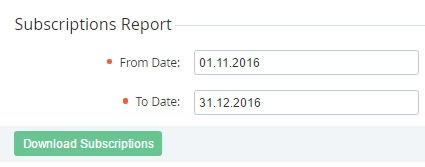
-
Click Download Subscriptions. The report will be sent to your email in the MS Excel format.
The subscriptions report includes the following information:
-
Subscription ID — the unique identification number of the subscription (see Managing subscriptions).
-
Subscription Name — the name of the subscription.
-
Account ID — the unique identification number of the account (see Managing accounts), to which the subscription relates.
-
Account Name — the name of the account, to which the subscription relates.
-
Plan ID — the unique identification number of the plan (see Managing plans), to which the subscription relates.
-
Plan — the name of the plan, to which the subscription relates.
-
Plan Category ID — the unique identification number of the plan category (see Managing plan categories), to which the subscription relates.
-
Category — the name of the plan category, to which the subscription relates.
-
Status — one of the following statuses of the subscription (see Viewing the list of subscriptions).
-
Created At — the date and time of the subscription creation. May be off the selected period if it differs from the subscription start date.
-
Updated At — the date and time when the subscription's status was changed last time.
-
Start Date — the activation date of the subscription.
-
Expiration Date — the expiration date of the subscription (see Setting the Expiration Date of a Subscription).
-
Month — the period of the subscription (in months).
-
Total — the total amount of the charges for the subscription.
-
Link — the link to the subscription's details page (see Viewing and updating subscription's details).